Field - crisis room coordination

The field and the command post, linked live.

Photos, live video, GPS position, radio and life-saving alerts, from a simple phone, with nothing to install. The crisis room in the pocket of every responder.

πŸ‡«πŸ‡· Hosted in France πŸ”’ Sovereign, no foreign cloud πŸ”§ On-premise or turnkey
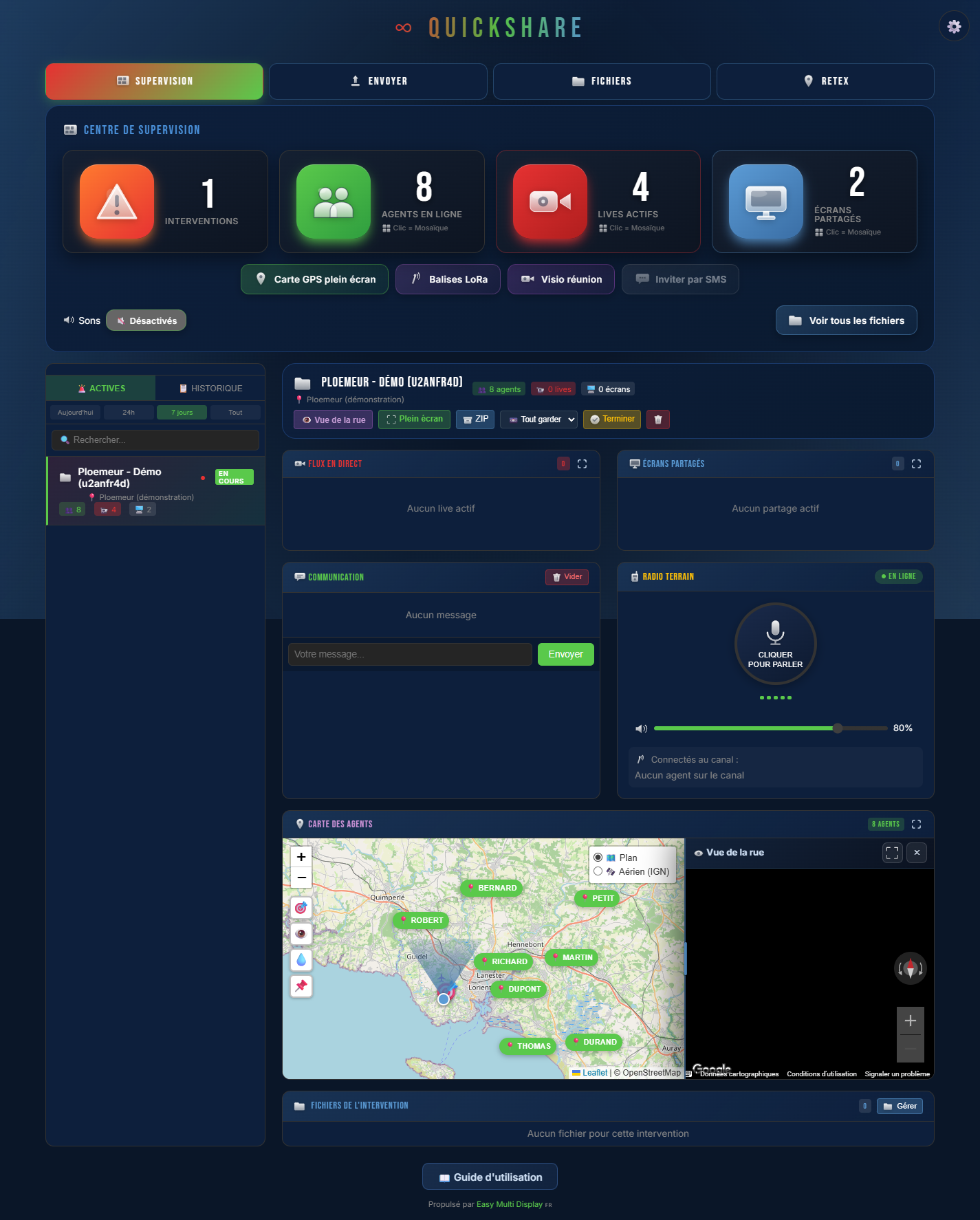
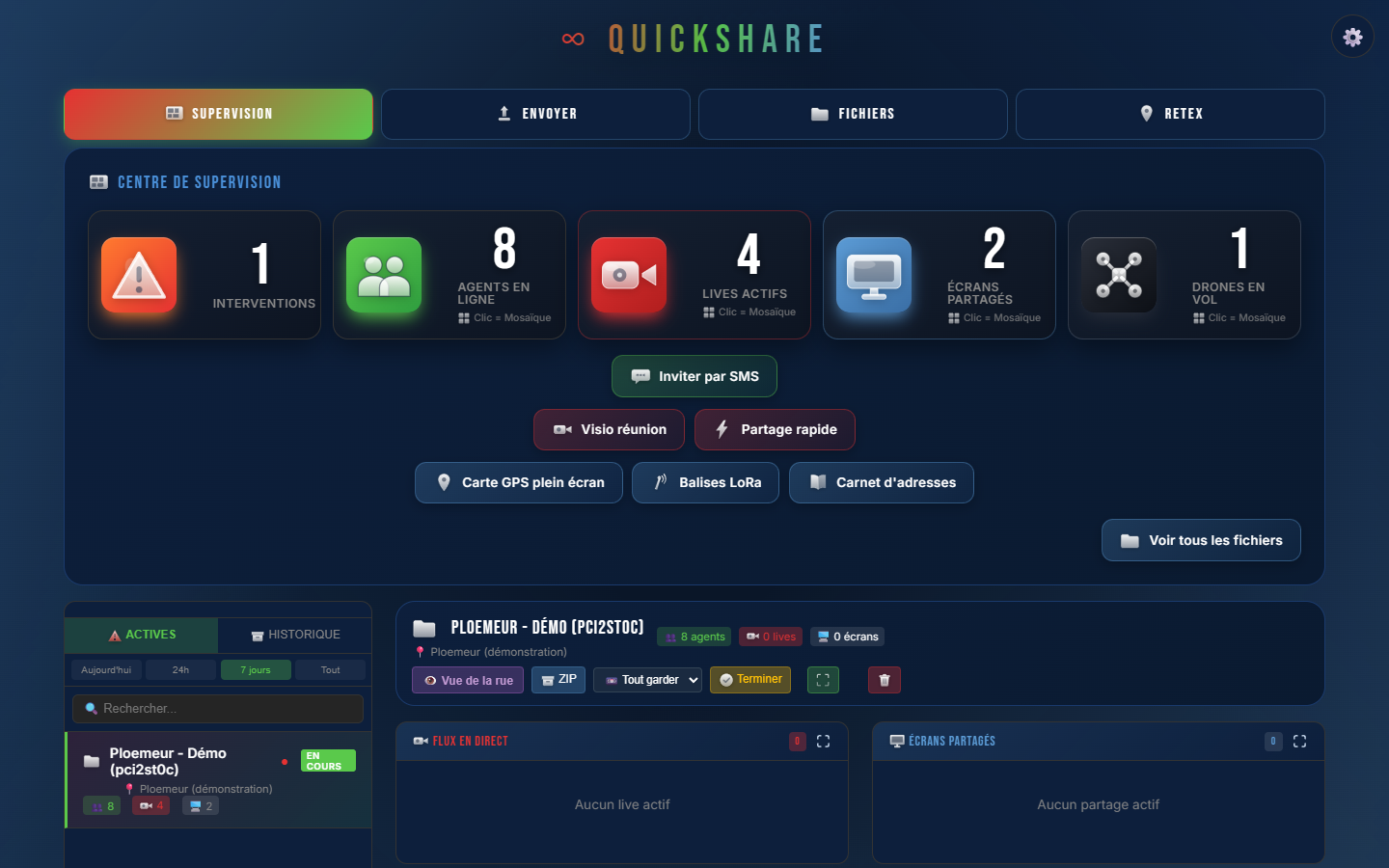
∞ QuickShare supervision centre: responders, cameras and screens live
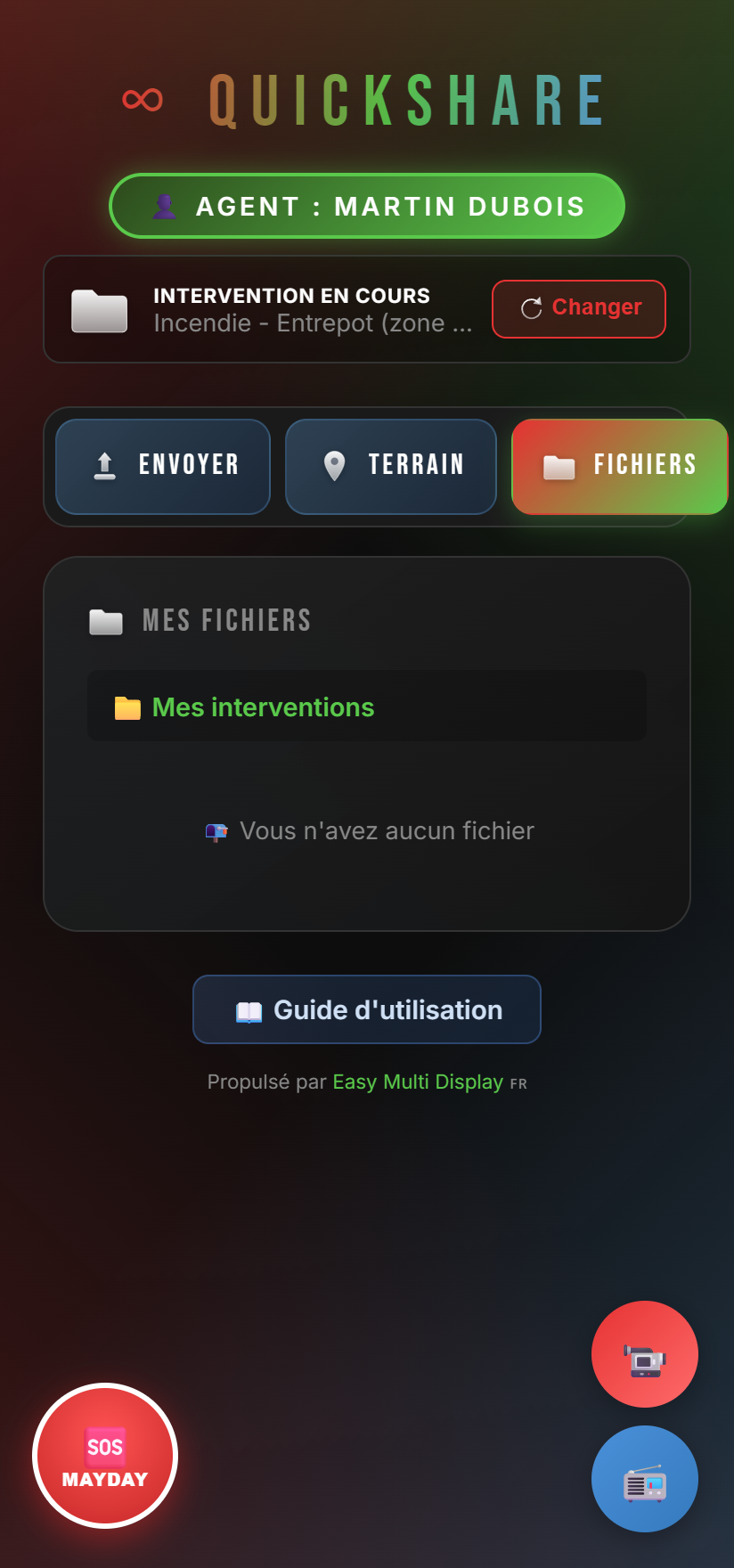
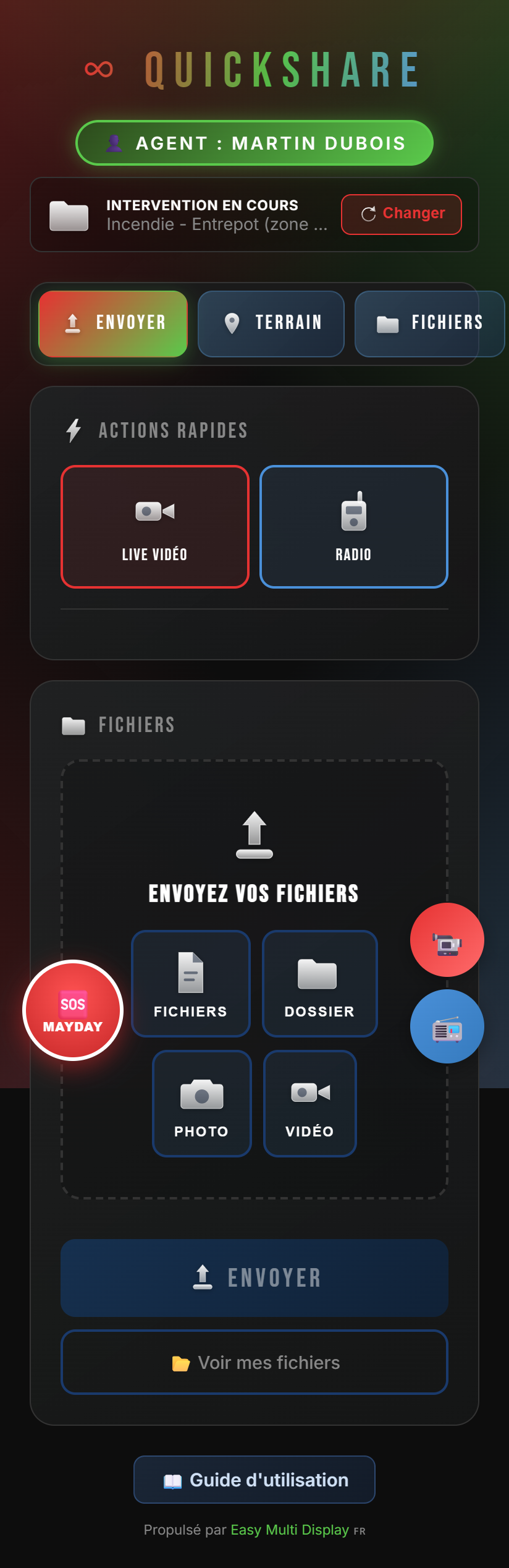
∞ QuickShare field app on a phone
πŸ‡«πŸ‡· Made in France
πŸ“‘ Works in dead zones
πŸ“± Zero installation
πŸŽ“ Zero training
πŸ›°οΈ Real-time GPS
πŸš’ 25 SDIS, SAMU and COD - EMD customers
The promise

See, speak, locate. In real time.

In the field, every second counts. QuickShare gives the command post the eyes, the voice and the position of every responder, instantly, from any phone. No app to download, no hardware to deploy: one link, and the team is connected.

Everything it does

A complete toolkit for emergencies

Every feature is designed to be used one-handed, under pressure, by operators who are not IT specialists.

πŸŽ₯

Live camera

The responder streams their feed to the command post instantly. The video server handles several responders at once, with three adjustable qualities to suit the network (ECO, SD, HD).

🚁

Live drone

A drone's feed from the field comes back to the crisis room, even hundreds of kilometres away: the pilot streams, the operator sees the aerial view live. Everything goes through your server in France, no foreign cloud.

πŸ›°οΈ

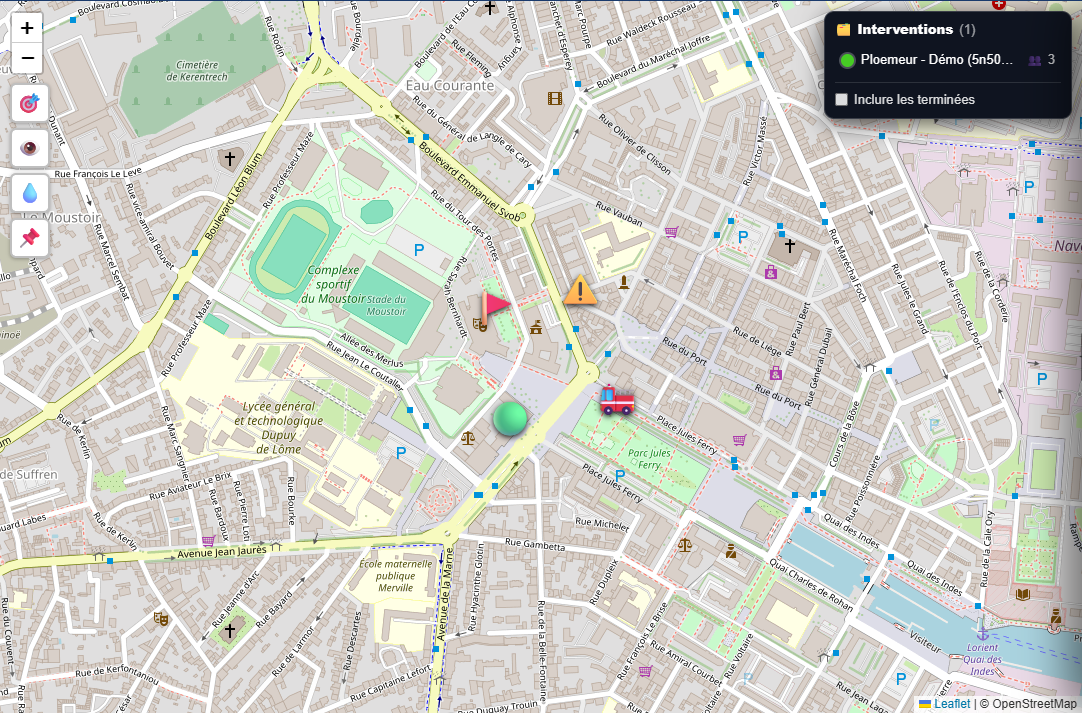
Real-time GPS map

Every responder is placed on the map, their route traced live. Full-screen view for the crisis room wall.

πŸŽ™οΈ

"Talk" radio

Push-to-talk through the browser: the whole team on the same channel. Press to speak, release to listen. The dispatcher can take the air for everyone.

πŸ†˜

MAYDAY alert

Permanent red button. Automatic "responder down" detection: a fall or prolonged stillness triggers an alert with the position, even when the network is lost.

πŸ“‘

LoRa radio beacons

Underground or in dead zones, radio beacons transmit responders' positions over the air, without any mobile network.

✏️

Live annotations

The command post draws on the responder's video: arrow, circle, text. The responder sees the annotation appear in real time. A red arrow is worth more than a long explanation.

πŸ“·

Photos & files

Take a photo, record video, or send documents and folders (images, videos, PDF, Word, Excel). Each item is geolocated on the map.

πŸ–₯️

Screen sharing

From a computer, show your screen to the command post: maps, plans, business software.

πŸ‘₯

Video meeting

Multi-party video meeting in a room dedicated to the incident, like a video conference: the command post and responders see and talk to each other live. Join in one click, no app.

πŸ“„

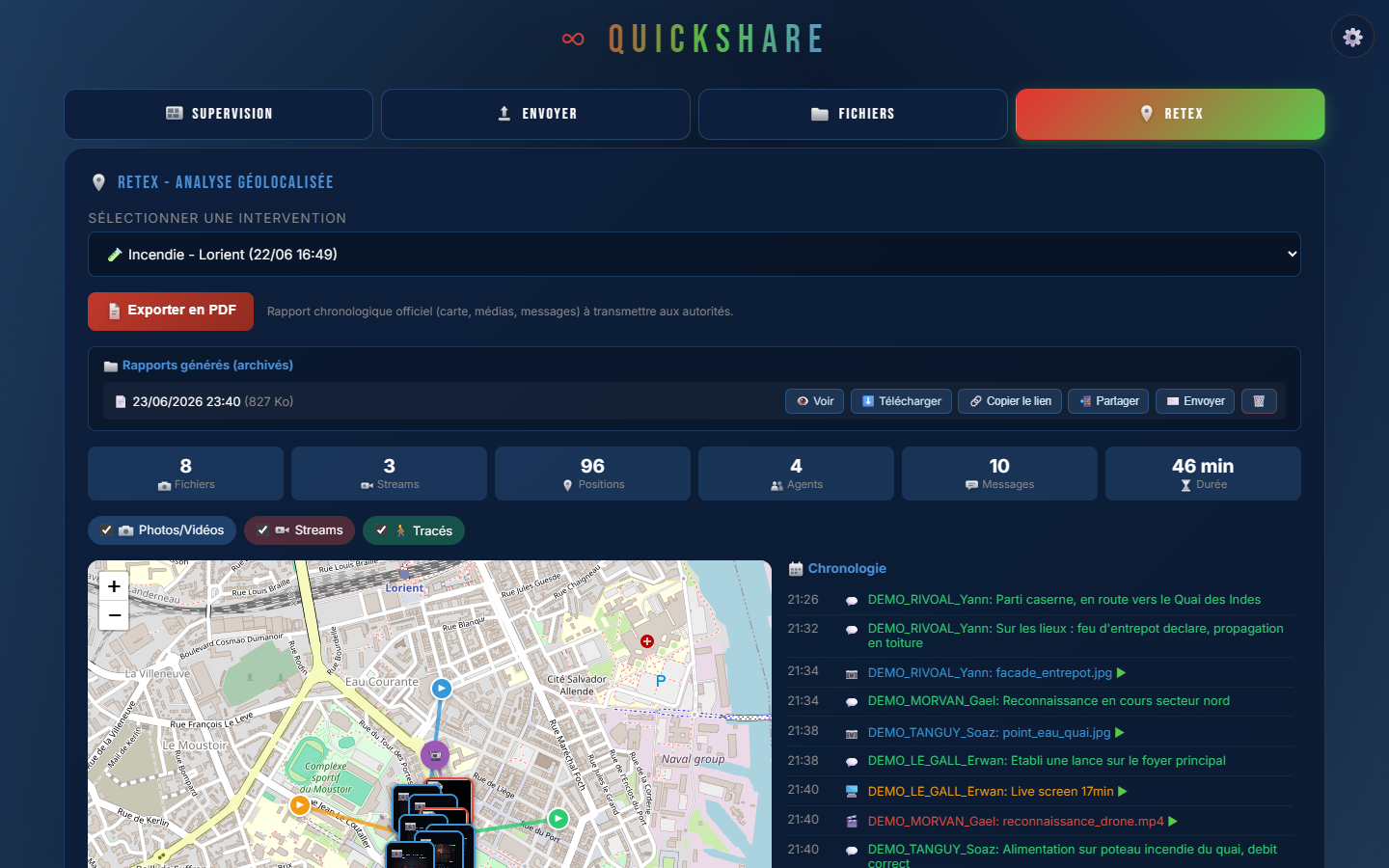
Official PDF report

A chronological PDF report of the operation (photos, videos, messages, voice, map), to send to the authorities. Archived, shareable by secure link or by email.

πŸ“€

One-tap sharing

Live, screen or invitation link: share it in one tap via your phone's menu (WhatsApp, SMS, email, Signal...). The recipient opens it, with nothing to install.

πŸ€–

AI control

QuickShare exposes a standard MCP connector: an AI assistant - local (Ollama, LM Studio) or cloud as an option (Mistral, Claude, DeepSeek...) - drives the application in natural language: create an operation, generate the after-action report, post a message, send a link. The AI can be local and sovereign, hosted in France.

🧩

Supervisor mosaic

Real-time counters and mosaics of responders, live feeds and screens, openable full-screen on a video wall.

πŸ’¬

Chat & ready-made messages

One-tap messages (Received, Danger, SOS, Withdraw, Done). Danger and SOS go out as a red alert on the command post side.

πŸ—ΊοΈ

Geolocated after-action debrief

Replay a finished operation on the map: responders' routes and positioned media. Chronological PDF export (photos, videos, messages, voice) ready to send to the authorities.

πŸ”—

Live link, no account

When a live feed starts, a link is generated: a reinforcement or a medical dispatcher opens the video in any browser, with no account.

πŸ“²

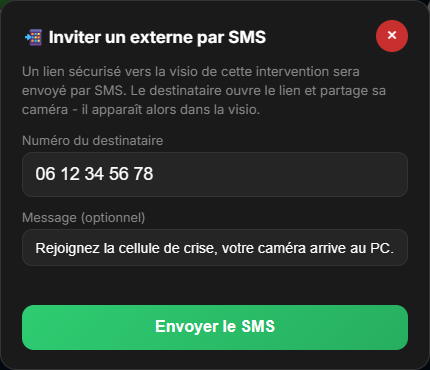
Invite by SMS

A witness, a victim, backup? Send an SMS - to one or several people from your address book. Each one opens the link and shares live what you chose: their camera, their screen, or a video call. No app, no account.

πŸ“‡

Crisis address book

Your recurring contacts (emergency medical, police, on-call officials, technical services, partners) one click away. Import your existing directory, and alert a whole group by SMS or email in a single move.

πŸ‘οΈ

Street view

Scout the location before you arrive: Google Street View or Panoramax (sovereign), with address search to explore the access routes, the rear of the building and the surrounding streets.

πŸ’§

Water points & fire hydrants

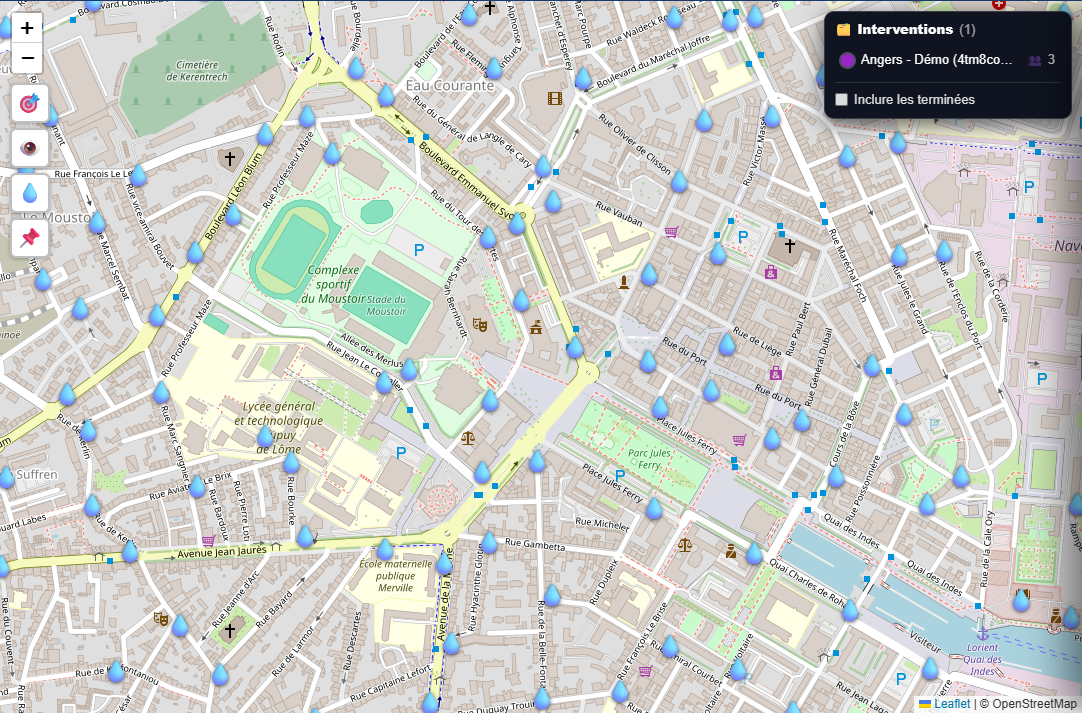
Show the hydrants and water points (DECI) around the operation, on the map. Know where the water is, before you even arrive on scene.

πŸ“Œ

Shared markers

The command post drops points on the map - vehicle access, danger zone, command post, assembly point - seen by every responder in real time.

βž•

One-click operation

The room leader clicks on the map: the operation is created with the address and GPS position filled in automatically. Ready in two clicks, under pressure.
No sign-up, no installation

Try QuickShare live, right now

Open a private demonstration room in one click. Invite a colleague from their phone (just a link): their camera appears in your command post, live. Radio, annotations, map - try everything, for real. The intervention is placed at your location: you and your guests appear on the same map.

β–Ά Launch the live demo

An isolated, short-lived room with no real data - ideal for a presentation with several people.

Two sides, one operation

Field side, command post side

The responder in the field

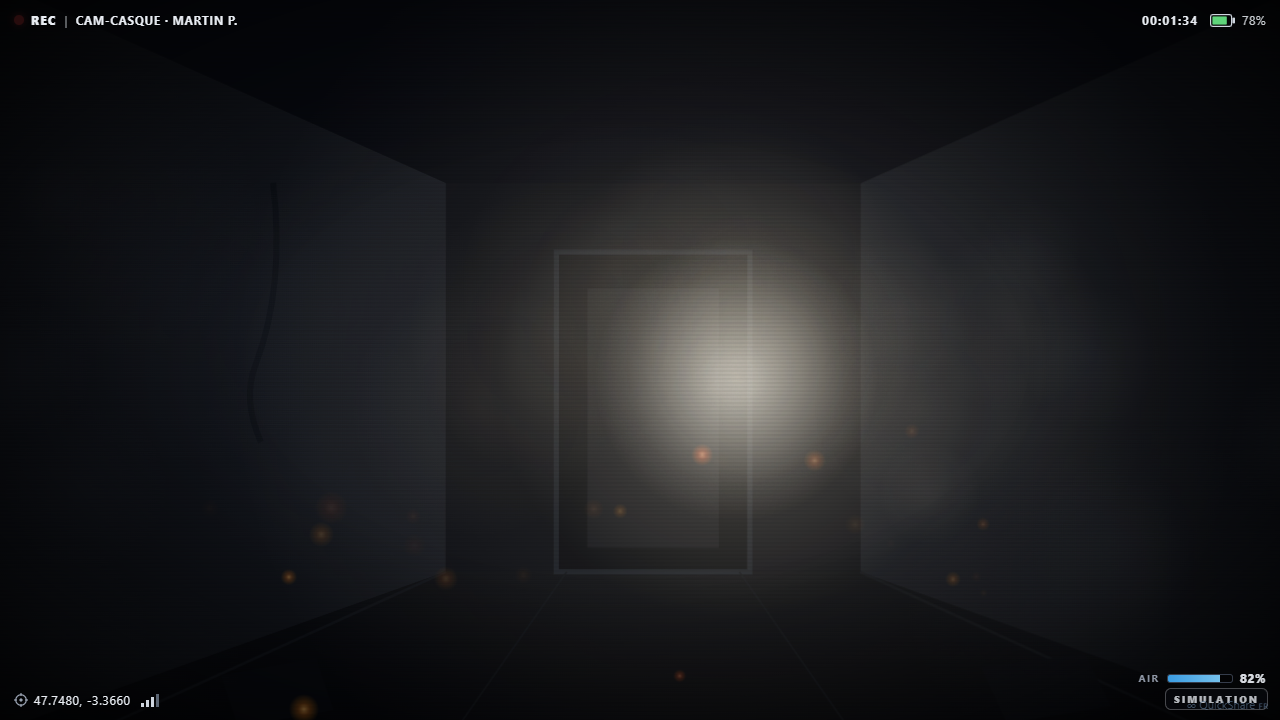
One screen, everything at hand

  • Starts their live camera or sends photos and videos
  • Talks to the team by radio, with a single press
  • Their position reports back automatically
  • MAYDAY button always within reach
  • Receives the command post's annotations on their video
Responder field view: video, map, messages and radio
The dispatcher at the command post

The situation at a glance

  • Sees all video feeds and screens in a mosaic
  • Tracks each responder on the real-time map
  • Takes the radio air for the whole operation
  • Annotates images to guide the teams
  • Receives life-saving alerts with the position
Dispatcher view: feed mosaic and operation map
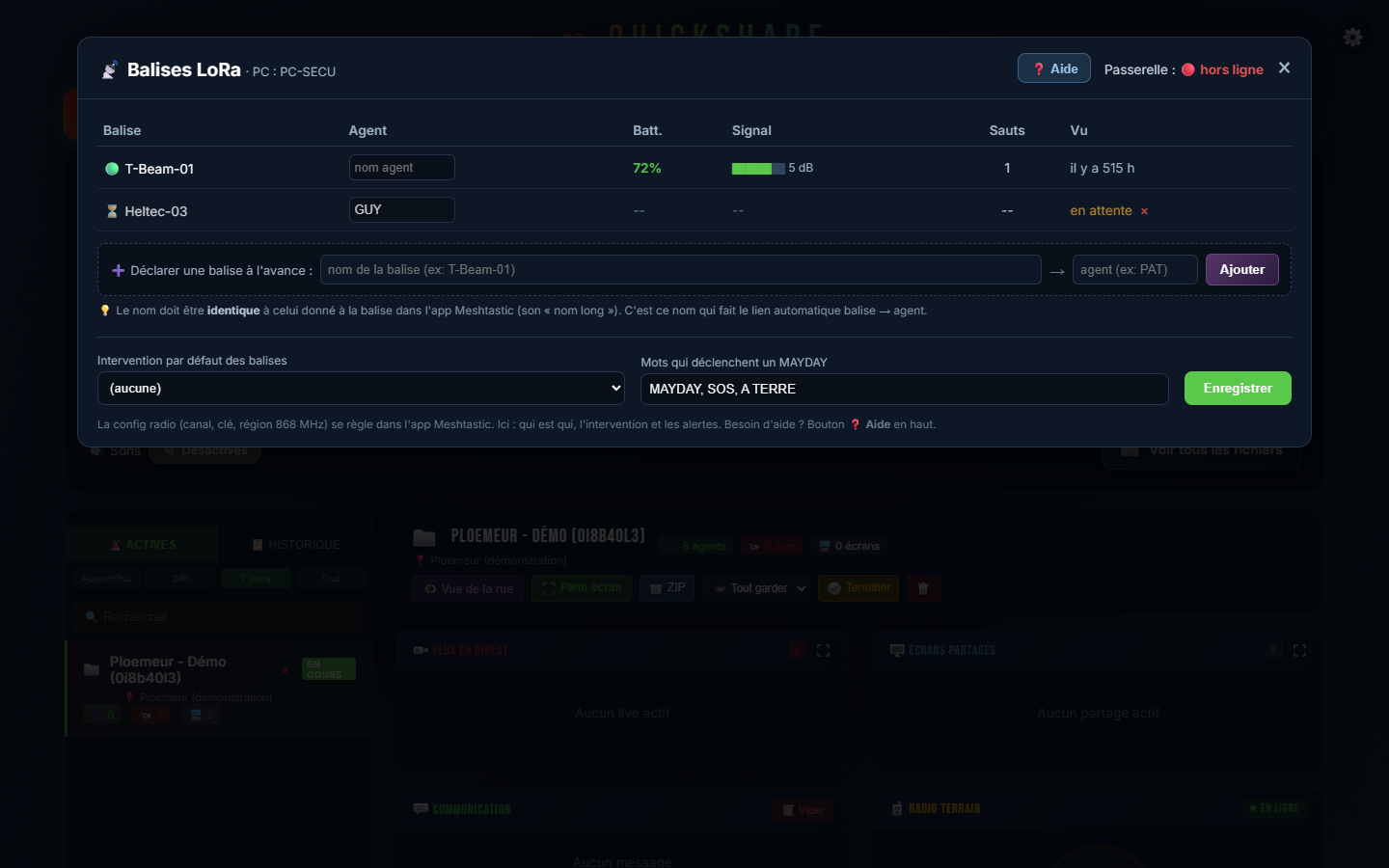
LoRa radio beacon table: battery, signal, relay
The real differentiator

Staying in contact, even with no network

Basement, car park, tunnel, isolated area: where 4G stops, QuickShare keeps going. LoRa radio beacons transmit responders' positions over the air, without any mobile network.

  • GPS tracking of responders in dead zones
  • Beacon table: battery, signal strength, relay, last contact
  • MAYDAY triggered by radio words (MAYDAY, SOS, RESPONDER DOWN)
  • Standalone gateway, simple to plug into the command post
Video rescue - remote assistance

See the scene through the caller's eyes

A witness or a victim calls the emergency centre. The operator sends them a simple link: one tap, nothing to install, and their phone camera streams live to the command post. You see the scene before your teams even arrive.

  • A link sent by SMS, the caller taps it: their camera turns on, no app needed
  • The command post sees the situation live and guides the first-aid steps
  • Sharp full-resolution photo triggered remotely, geolocated and time-stamped, filed in the incident folder
  • Weak connection? Automatic switch to photo mode: a recent image of the scene at all times, even where video no longer gets through
  • Assess the emergency and prepare the response before the units arrive
  • The caller's GPS position comes up automatically
  • Single-use, expiring link: no trace once the call is over

In line with the video-rescue solutions already adopted by emergency services, but sovereign and hosted in France.

Video rescue: the command post sees live the scene filmed by the caller's phone
Aerial view - drone

The view from the sky, in the crisis room

A drone is flying over the incident? Its image comes back live to your command post, wherever it flies - even if the crisis room is hundreds of kilometres from the field. Compatible with any drone or encoder on the market that streams live (DJI, Autel, Skydio, OBS...), the pilot streams from their drone's app and the operator sees the aerial view with nothing to install. The feed goes through your server, hosted in France: no foreign cloud.

🚁

From the sky to the command post, live

The drone's aerial view appears in the crisis room mosaic, alongside the responders' cameras and the shared screens.

🌍

Field and room far apart

The drone and the command room can be on different networks, around a hundred kilometres apart: the server bridges the two.

πŸ‡«πŸ‡·

Sovereign

The feed goes through your infrastructure hosted in France, never through a foreign cloud. In EMD's "Local First" philosophy.

⚑

Zero installation

The pilot receives a link to paste into the drone's app; the operator opens a screen that's already set up. Nothing to configure.

Responder safety

No one is left alone

Protecting the responder is built into the heart of the tool. With one press, or even on its own, the device raises the alert and transmits the last known position.

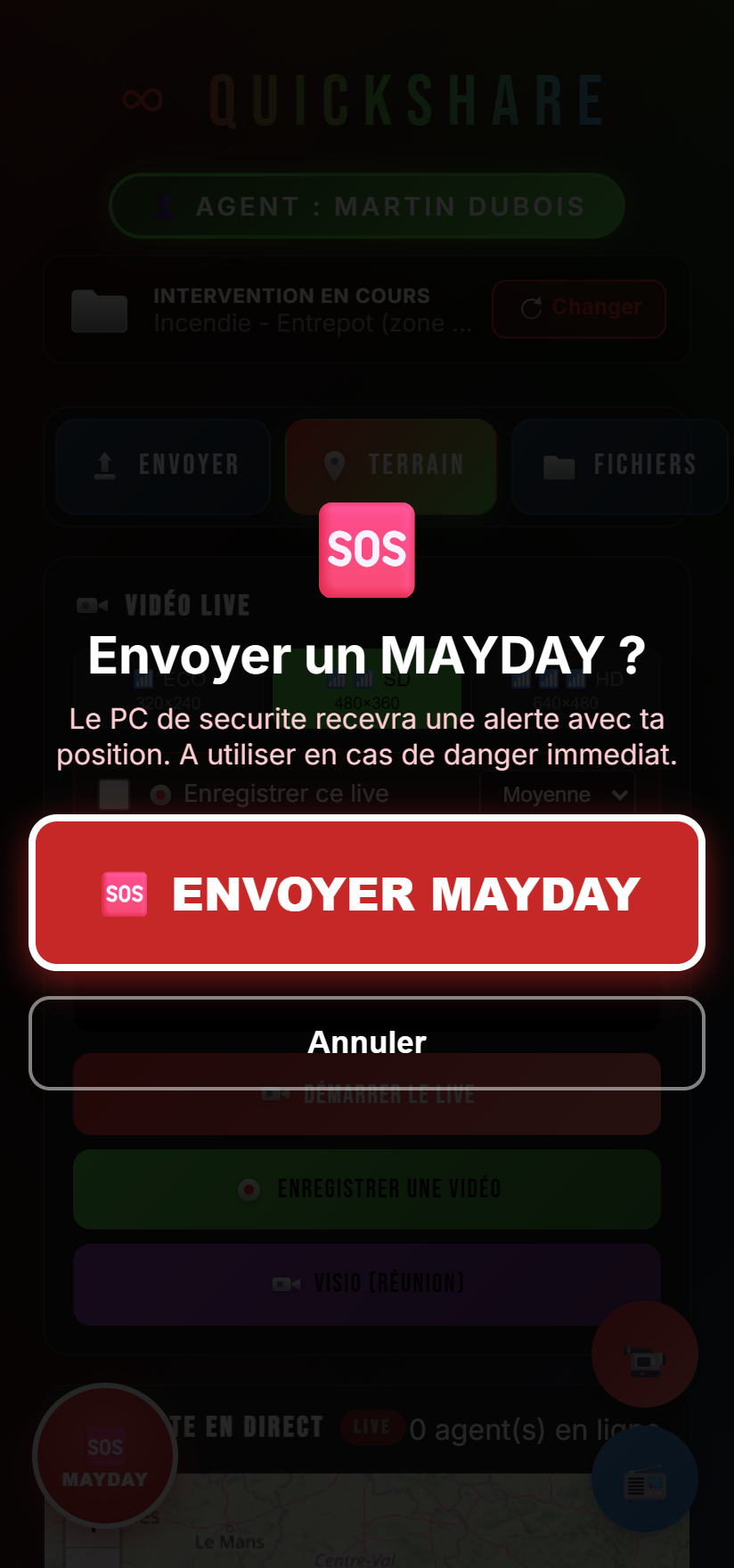
  • Red MAYDAY button, always visible
  • Automatic fall detection (acceleration spike)
  • Prolonged stillness detection, with a cancellable countdown
  • Audible alert and position reported to the command post, even when the network is lost
MAYDAY alert screen on the responder side
Advanced - AI control

You write to QuickShare, it executes

QuickShare presents itself as a set of tools an AI assistant can drive, through the MCP (Model Context Protocol) standard. The room leader types an instruction in natural language - the AI handles the rest.

AI assistant
Local or cloud Ollama, LM Studio, Mistral, Claude, DeepSeek...
MCP connector
Separate server translates QuickShare's API into tools the AI can call. Changes nothing inside the application.
QuickShare
The action runs operation created, after-action report generated, message posted, live link sent...
How it works

One instruction, the AI executes

  • QuickShare publishes a local command API; an MCP server turns it into about thirty tools the AI can call
  • "Open an operation at 12 Rue des Lilas", "generate the after-action report", "send a live link to the medical dispatcher" - and it's done
  • Model-agnostic: 100% local AI (Ollama, LM Studio) to stay sovereign and offline, or cloud as an option (Mistral, Claude, DeepSeek...). The choice is yours
  • Separate program: it calls the API, it does not touch the core of QuickShare
Safety first

The human stays in control

  • State reading and convenience actions open by default (create an operation, post, generate a report)
  • Critical actions (delete an operation, purge media) disabled by default, behind a setting
  • They only switch on by a human's decision - crisis room, lives at stake
  • In EMD's "Local First" spirit: no cloud imposed, nothing leaves without your consent
Why QuickShare

Built for the French emergency services

01

Sovereign, hosted in France

No foreign cloud, data under control, in EMD's "Local First" philosophy.

02

Deployment your way

Turnkey hosting by EMD, or installation on your own server for full sovereignty. We support you in both cases.

03

Works everywhere

On 4G as well as in dead zones thanks to the radio beacons, and the video adapts to weak networks with ECO mode.

04

Zero installation, zero training

Everything runs through the phone's browser. A readable screen, designed for operators aged 50 and over, under pressure.

05

Built-in responder safety

MAYDAY and "responder down" detection with immediate position reporting.

06

Within the fire service ecosystem

Part of the EMD suite already deployed with fire services (SDIS), SAMU and prefectures (NexSIS, SYSTEL environment).

In the field

Concrete use cases

πŸ”₯

Fire

The crew leader sends photos of the facade, starts the camera to show the spread, the command post draws an arrow to point out an access route and tracks each team. Network lost inside the building? The beacons keep the position.

πŸš—

Road accident

The team sends photos and a live feed of the vehicle, the command post shares a map, geolocates the operation and coordinates reinforcements by radio. A live link can be sent to the medical dispatcher, with no account.

🌊

Flooding

Responders continuously report photos and positions of the affected areas. The real-time map and route tracing give an overall picture, and the after-action debrief replays the operation for the review.

πŸ›οΈ

Crisis unit (COD)

The video wall shows the mosaic of live feeds and the responder map across several operations. The dispatcher communicates by radio and archives each operation as a ZIP for traceability.

In pictures

The app in real conditions

Screenshots of the software, in demonstration mode. Click to enlarge.

Who it is for

For those who manage emergencies

πŸš’

SDIS - Fire services

Crew leaders, field teams, CODIS and the operations room.

πŸš‘

SAMU & rescue

Field coordination and medical dispatch.

πŸ›οΈ

Prefectures & COD

Crisis units and departmental operations centres.

πŸ›‘οΈ

Command rooms

Security posts, industrial sites, major events.

25
fire services equipped (EMD suite)
35
command rooms
100%
hosted in France
2
deployment modes
For IT departments / CIOs

Two deployment modes

Hosted by us, or installed entirely on a server within your own walls: you choose your level of sovereignty.

Turnkey

Hosted by EMD

  • Nothing to install, operational right away
  • Server hosted in France, maintained by EMD
  • Updates and monitoring included
  • Ideal for getting started fast
  • Subscription, all-inclusive
On your infrastructure

Everything on one server within your walls

  • No subscription: your installation is yours to keep
  • Application, video, GPS tracking and RETEX history: everything runs on a single server at your site, your data never leaves
  • Total sovereignty, designed for IT-department constraints
  • EMD installs, configures, updates and trains your teams

What you provide: a server (physical or virtual machine), and - to receive a caller or a responder from outside - a secure gateway to that server (reverse proxy / DMZ controlled by your IT department, like for your portal or webmail), with a domain name and its certificate.

Only exception: sending SMS goes through a carrier gateway - yours (your existing alerting tool) or ours. The link can also be shared without SMS (QR code, read out to the caller). Everything else stays within your walls.

Support

Set-up in 4 steps

You provide the server, EMD takes care of the rest. From the first video call to going live, you are supported end to end.

1

Scoping

Together with your IT department we define your needs, your network constraints and the server specifications. Thanks to reuse, a machine a few years old is enough.

2

Installation

EMD installs and configures the whole solution on your server - application, video, map, RETEX history - remotely or on site, under your IT department's control.

3

Acceptance

We validate together under real conditions: responders' cameras, caller, drone, all coming back onto your crisis wall.

4

Training and operation

Hands-on for operators with no jargon, going live, then updates and support provided by EMD.

Our customers

They chose Easy Multi Display

25 SDIS, SAMU 18 and COD 30 use our display and crisis room solutions. QuickShare is the latest addition to the EMD suite, designed to extend that trust all the way to the field.

SDIS SAMU COD
SDIS 04SDIS 11SDIS 12SDIS 14SDIS 15SDIS 17SDIS 18SDIS 29SDIS 40SDIS 41SDIS 42SDIS 45SDIS 46SDIS 49SDIS 52SDIS 53SDIS 54SDIS 58SDIS 60SDIS 61SDIS 65SDIS 66SDIS 76SDIS 79SDIS 87SAMU 18COD 30
The EMD ecosystem

QuickShare within the Easy Multi Display suite

QuickShare is the "field" building block of a Made in France software suite for managing crisis rooms and video walls, already deployed with the French emergency services.

Let's get practical

See QuickShare in action

Request a demonstration: we show you, in real conditions, how to link your field teams to your command post in just a few minutes.

Discover Easy Multi Display

or directly: contact@easymultidisplay.com